

AI Text-To-Video Tutorial Using Moonvalley
Moonvalley is a new AI-powered tool that transforms simple text prompts into visually stunning, high-definition videos and animations. Content has never been in higher demand than it is now; such AI tools are revolutionizing the world of content creation and design by offering quick, innovative, and hassle-free solutions. In this tutorial, we will guide you step-by-step on how to use Moonvalley effectively and generate your own videos solely from text.
Moonvalley is a free tool, and to utilize its full capabilities, similar to Midjourney, users are directed to join their Discord server for a more integrated experience and real-time support.
Step-by-step Guide:
1. Accessing Moonvalley:
Visit the Moonvalley website to start your journey. The interface is user-friendly and intuitive, designed for users of all levels of expertise.
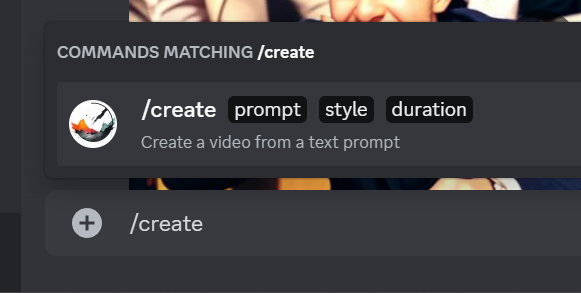
2. Understand the Prompting System:
Before you begin, you’ll notice that there are three key prompts that you must fill out:
- General Prompt: This is where you describe the primary content of your video. This can be a short story or even just a simple description.
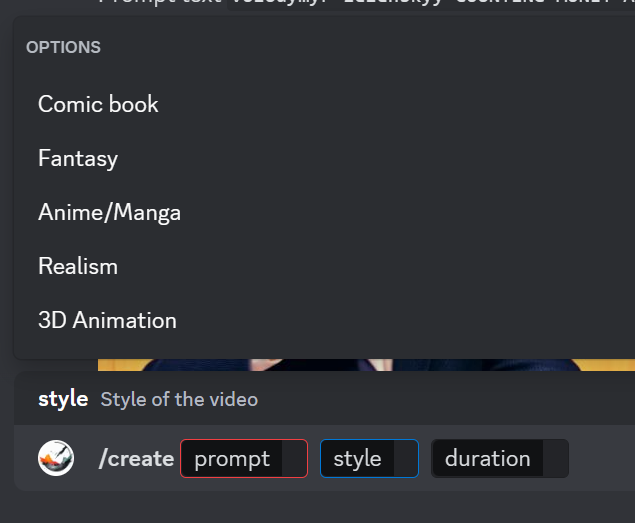
- Style: This will dictate the visual aesthetic of your video. Current options might include styles like “Anime,” “Illustrative,” “Soft Macabre,” etc.
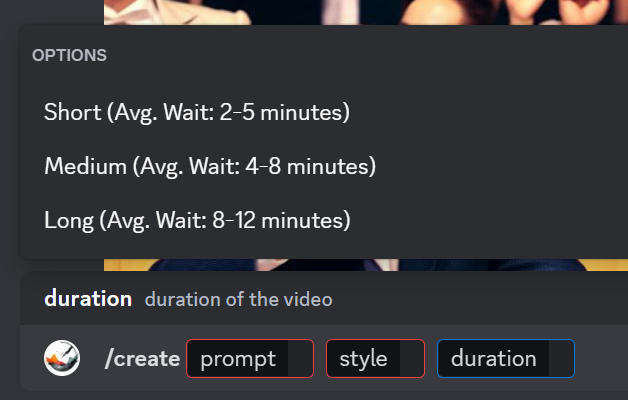
- Duration: This defines the length of your video. Currently, the durations available are approximately three seconds, four seconds, and five seconds.
3. Crafting an Effective Prompt:

According to filmmaker Paul-Vincent Alexander, a practical approach to prompting image generators like Moonvalley is to think of it as telling a short story or summarizing the plot of a film in one sentence. Start with the subject, describe their actions, and specify where.
For instance, instead of writing, “An Anime style of Robots that are illustrated, building a snowman,” you can simply write “Robots building a snowman” and choose the ‘Anime’ style. Alexander shared some of his own original prompts and outcomes with nft now below.
Example Prompts
Prompt text: a stuffed furry rapper muppet dancing tik tok in a dilapidated hauted house garden,soft macabre style, vibrant colors,horror movie color palette style
Prompt text: wide shot interior of a kitchen white cabbnets
Prompt text: (gran turismo intro) (cars racing)
4. Review and Refine:
Upon entering your prompt, Moonvalley’s AI will generate a video. If the outcome isn’t as expected, consider refining your prompt or specifying certain details. For instance, a vague prompt like “Robots building a snowman” might yield “snowman robot men” because the AI might not have enough context. However, adding specific attributes or styles can help guide the AI more effectively.
One drawback of the tool is the length of the videos themselves. While some users would like to generate videos that are minutes long, Moonvalley is limited to just a few seconds.
For users looking for more options and features, you might want to check out PikaLabs, which also offers similar capabilities through its Discord platform.
The Changing Landscape of Content Creation
The emergence of AI tools like Moonvalley and PikaLabs is undeniably shifting the paradigms of content creation and design. With the ability to instantly convert ideas into visual representations, creators can now experiment more freely, test out visions without hefty production costs, and produce content at an unprecedented speed. The endless possibilities with such tools make it an exciting era for digital media and content creators.
With an understanding of how Moonvalley works, you’re now equipped to tap into the vast potential of AI-driven video generation. Remember, like any tool, it requires a bit of practice and refining to achieve perfection.

AI Resources
Join the Now Network for access to premium AI resources, tools and prompts curated by our community of builders, creators and collectors.